
Trading Game - Stock Simulator
tradinggame.comFinance
4.6888.00 Reviews
- Version
- 4.78
- Installs
- 1.00M
- Age Rating
- Everyone
Screenshots



Our Review of Trading Game - Stock Simulator
 Analysis by Appyee
If you’re curious about investing but not ready to put real money behind your decisions, a simulator can be a useful first step. I’d treat Trading Game - Stock Simulator as a place to practise thinking through trades, not as a shortcut to becoming a confident investor. That distinction matters: virtual wins can make the market feel easier than it is, while a more careful practice routine can help you spot what you still need to learn.
Choose it for practice, not predictions
The key question is what you want from a finance app. If you need to manage a real portfolio, compare funds, or make decisions about money you plan to invest, a brokerage or dedicated research tool is a better fit. If you want a low-pressure way to explore how stock prices and trade choices feel, this app’s simulation and learning focus are more relevant.
I’d use it with a specific question in mind rather than tapping through trades at random. For example, you could practise deciding what information you would want before buying a company, then observe how your virtual position changes. Keeping a short note about why you made each choice can be more useful than simply watching a balance go up or down. It turns the experience into a record of your reasoning, including the moments when a good result came from luck rather than a sound process.
That approach is especially helpful for beginners who find financial language intimidating. A lesson or quiz can give a concept some structure, while the simulator gives you a place to connect it to a decision. Still, passing a quiz or making a profitable virtual trade does not prove that you can handle real market risk. I would use the app to build familiarity and questions, then seek more complete guidance before committing savings.
Where the simulator earns its place
What makes this particular option appealing is the combination of practice and instruction in one app. Plenty of finance apps focus on viewing accounts or following prices; this one is aimed at learning through simulated participation. Its AI coach is part of that beginner-oriented pitch, but I would treat any coaching as a prompt for learning, not as an authority that can make investment decisions for me.
The app comes from tradinggame.com and sits in the finance category. It is free to install, with in-app purchases listed from $4.99 to $249.99 per item, so I’d check what a purchase offers before paying and avoid assuming that extra spending is necessary to learn the basics. Its Everyone age rating makes it broadly accessible, though younger users will still benefit from an adult explaining the difference between a practice balance and actual money.
There is a useful behavioral lesson in paper trading that is easy to overlook: practice can reveal whether you tend to chase a rising price, sell quickly after a dip, or make too many changes. To get value from that, I’d try one simple rule at a time and review the decisions after a session. Avoid changing several habits at once; otherwise it becomes hard to tell which choice affected the result. This is a more grounded use of the simulator than treating a leaderboard position as proof of investing skill.
When another kind of finance app is better
Compared with a standard brokerage app, a simulator lowers the immediate stakes, which is useful for exploration but also removes the emotional pressure of losing money. That means it cannot fully prepare you for the feelings involved in a real investment. A brokerage is the appropriate tool when you are ready to manage actual holdings and understand the risks; it is not automatically the better learning environment for someone who is still working out basic concepts.
Compared with a market-news or portfolio-tracking app, Trading Game puts more emphasis on trying decisions than on organizing real financial information. If your main goal is to follow a watchlist or keep an eye on accounts you already own, a focused tracker may be less distracting. If your goal is to learn why a trade might be risky, a simulator with educational material has a clearer role. I would not expect any single app to replace both practical investing tools and independent research.
One realistic way to fit it into a day is to spend a few minutes after reading a market headline asking what you would do and why, then check the virtual outcome later rather than reacting to every movement. That routine can help separate an initial hunch from a considered decision. It also makes the news section more useful as a source of context, instead of a stream of prompts to trade. For a beginner, learning when not to act is as important as learning how to place a simulated trade.
Make the practice transfer carefully
The biggest limitation of any stock simulator is the gap between simulated results and real investing. A virtual portfolio can make experimentation feel consequence-free, and that can encourage risk-taking that would be uncomfortable with savings on the line. I’d use it to learn terminology, test a decision-making routine, and notice emotional habits—not to forecast personal returns or copy a successful run into a real account without further research.
There is also a practical trade-off in making learning competitive. Leaderboards and achievements can help keep a new user engaged, but they may reward attention to short-term results over patient reasoning. If competition makes you take trades just to climb a ranking, ignore that pressure and set your own learning goal. The app is most useful when the activity serves your understanding rather than the score.
Trading Game has an average rating of 4.6 from around 21,000 ratings, and it has passed one million installs. It was released on February 5, 2017; version 4.78 supports Android 8.0 and later. Those details make it a well-established option for Android users, but the right choice still depends on whether its learning-through-simulation approach matches your needs.
My recommendation is to try it if you’re new to stocks, want a structured way to practise, and can keep virtual results in perspective. It is less suitable if you need a real-money account, detailed personal financial planning, or a reliable signal telling you what to buy. If you do use it, start with the lessons, make deliberate choices, and review your reasoning before celebrating a win. That gives the app a sensible role: a practice space for building questions and habits, rather than a promise that simulated success will translate directly into real-world returns.
Ever wondered what it’s like to dip your toes into the world of stock trading, but without the risk of losing your hard-earned cash? Enter the Trading Game - Stock Simulator, an app that lets you experience the thrill and strategy of the stock market, all from the palm of your hand.
First Impressions
When you first open the Trading Game - Stock Simulator, you're greeted with a clean and intuitive interface. It's like stepping into a virtual trading floor, minus the chaos. The app does a fantastic job of making a potentially complex world feel accessible. Whether you’re a total newbie or someone with a bit of trading experience, you’ll find the navigation straightforward and user-friendly.
Getting Started
Setting up is a breeze. You start by creating a profile, choosing your level of trading experience, and then you’re off to the races. The app provides you with virtual currency to start investing in a variety of stocks and markets. This play money is perfect for learning the ropes without the anxiety of losing actual funds.
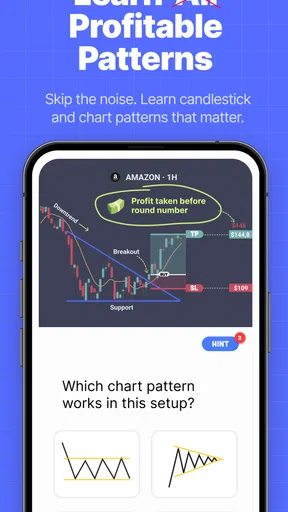
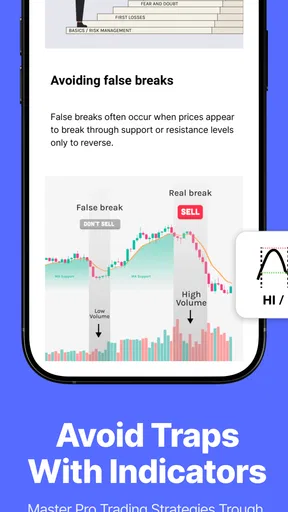
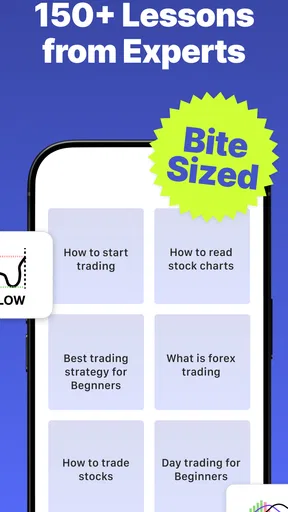
One of the standout features here is the educational content. The app offers a series of lessons and quizzes designed to build your trading knowledge from the ground up. These range from basic concepts like "What is a stock?" to more advanced topics like "Technical Analysis." It's like having a mini trading course built right into the app.
Diving into the Details
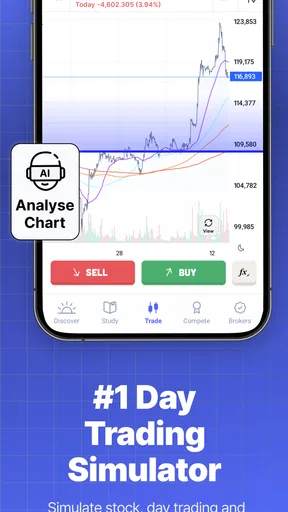
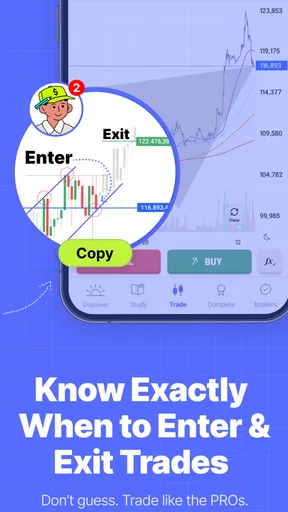
The heart of the app is, of course, the trading simulator. You can buy and sell stocks in real-time, using real-world data. It’s a fantastic way to see how your decisions would play out in the real market. I found myself glued to the screen, watching my portfolio rise and fall with the market trends.
The app also includes a news section, which keeps you updated on the latest market happenings. This is an invaluable resource, as it helps you make informed decisions about your trades. Plus, it’s always fun to predict market movements based on current events.
Features Worth Highlighting
Besides the trading and educational aspects, the app offers a few other features that enhance the experience:
- Leaderboards: See how you stack up against other users. It’s a great way to add a competitive edge to your virtual trading.
- Achievements: Earn badges and rewards as you progress, which adds a gamified element to learning.
- Customizable Alerts: Set up notifications for stock price changes, so you never miss an opportunity.
Real-Life Application
What I truly love about this app is how it bridges the gap between simulation and real-world application. The skills and strategies you learn here can be directly applied if you ever decide to take the plunge into actual stock trading. It’s a safe, no-pressure environment to test theories and strategies.
Final Thoughts
Overall, the Trading Game - Stock Simulator is a fantastic tool for anyone interested in learning about the stock market in a risk-free environment. Whether you're just starting out or looking to hone your skills, this app provides a comprehensive and engaging platform to explore trading. Plus, with its educational resources, you’re not just playing a game—you’re learning a valuable skill.
If you’ve ever been curious about trading, but didn’t know where to start, this app is definitely worth a download. It’s educational, entertaining, and best of all, you can make all the rookie mistakes you want without losing a dime. So go ahead, give it a try and see if you have what it takes to become a virtual trading mogul!
Verdict
Strengths of Trading Game - Stock Simulator
- Engaging tutorials for beginners
- Real-time market simulations
- No real money risk involved
- Wide range of stocks to trade
- User-friendly interface
Limitations of Trading Game - Stock Simulator
- Limited advanced trading tools
- Ads can be intrusive at times
- No offline mode available
- Requires constant internet connection
- In-app purchases may be pricey
Similar Picks in This Category
View All
Google Wallet
Google LLC4.3

Airtel: Recharge, Bank & Loans
Airtel4.0

PayPal - Pay, Send, Save
PayPal Mobile4.2

DANA Indonesia Digital Wallet
PT Espay Debit Indonesia Koe4.5

Binance: Buy Bitcoin & Crypto
Binance Inc.4.8

Cash App
Block, Inc.4.7
Frequently Asked Questions
What is Trading Game - Stock Simulator?
Trading Game - Stock Simulator is an educational app designed to teach users about stock trading and investment strategies. It provides a risk-free environment where users can practice trading with virtual money, explore real-time data, and gain insights into the stock market without financial risk.
Is Trading Game - Stock Simulator free to use?
Yes, the Trading Game - Stock Simulator is free to download and use. However, it may offer in-app purchases or premium features that enhance the learning experience, such as advanced trading tools or ad-free usage. Users can enjoy the basic features without any cost.
Can I use real money in Trading Game - Stock Simulator?
No, Trading Game - Stock Simulator does not involve real money. It is purely for educational purposes, using virtual money to simulate stock trading. This allows users to practice and learn about trading without any financial loss, making it ideal for beginners.
What devices are compatible with Trading Game - Stock Simulator?
Trading Game - Stock Simulator is available on both Android and iOS platforms. It requires a compatible device running a supported version of the operating system. Users can download it from the Google Play Store or the Apple App Store, depending on their device.
Does Trading Game - Stock Simulator require an internet connection?
Yes, an internet connection is typically required to access real-time data and updates in Trading Game - Stock Simulator. Some features, like live market data or competitive leaderboards, depend on internet connectivity to function correctly. Offline access may be limited to certain aspects of the app.
